Protein production data acquisition with agentic AI: what I’ve learned.
TL;DR
This writeup describes an AI agent that extracts structured information about protein production protocols from academic publications. It uses previously published Expert data format. I describe the data sources and the software stack that I used to implement the agent. In short, it works quite well, although it takes a long time and a lot of compute to process the long manuscripts. Lots of valuable information can be extracted, but some important fields are often left out of the papers.
This is an unfinished project. Mostly this is a long “note to self” in case I have an opportunity to get back to this. This is not an academic paper, so apologies in advance if some acronym is not explained in the glossary. Feel free to reach out to me on email or on socials if you find mistakes or think that this post can be improved.
Rationale
Production of protein reagents is a critical early step in drug discovery, structure determination and other applications in chemistry and biology. The DNA sequence of the protein of interest (POI) first has to be cloned into a vector - a biological entity that is capable of infecting cells, usually a virus or a plasmid. The vectors are then transfected into the host cells that express the protein. Once the protein is expressed, it needs to be purified, before it can be used for downstream experiments like measuring the potency of a drug candidate or the immune response to the antibody (Fig. 1).
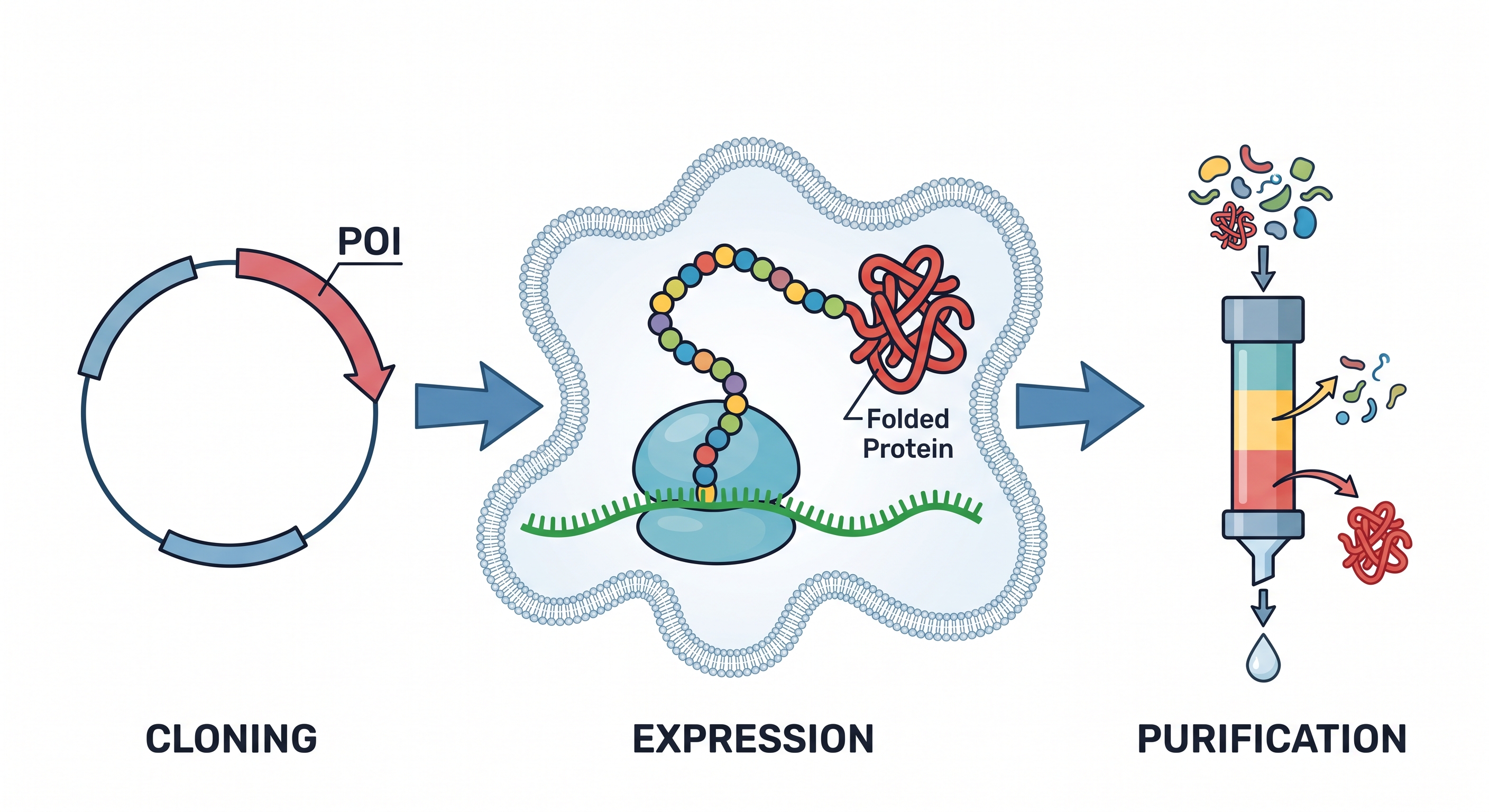 Fig. 1. The protein production process. Figures generated by Gemini.
Protein production is an error prone process that often goes wrong: proteins either fail to express or cannot be purified. In nature, proteins are produced in living cells under tightly regulated conditions, often in tiny concentrations and bound to other biomolecules. Replicating these conditions in the lab, or finding other suitable conditions to recombinantly express and purify the POI, may be challenging or impossible. First and foremost, success of protein production depends on protein-intrinsic conditions, such as protein and DNA sequence, physico-chemichal properties of the construct, usage of tags, co-expressing partner proteins and chaperones. Other factors that affect the outcome include the choice of vector and host, cell growth time and temperature, induction and lysation methods, purification protocol details, composition of wash and solution buffers, etc.
Results and protocols of protein production experiments are regularly published in peer reviewed academic journals, typically within the context of downstream results, such as protein structures or drug discovery studies. I am not aware of any bioinformatics resource or a database that standardizes and catalogs this information, like the PDB does for protein structures or Uniprot for proteins in general. Such a resource would be extremely valuable for academia and industry as a historic reference of protein production protocols (both successful and failed), for experiment reproducibility and as a source of training and evaluation data for AI models.
The data capture templates defining the protocol details have been proposed by the Expert paper. They contain the information about the target, the construct, expression and purification protocols. Bacterial, insect and mammalian expression hosts are covered, along with cell-free systems. The templates support capturing the information about the protein complexes. Two datasets that demonstrate how these templates can be applied in practice have been deposited to BioStudies (1, 2). This project takes the Expert work further, by using AI to curate protein production protocols from academic publications.
Here is an example of how a protein production protocol is described in a publication :
Cloning of Expression Plasmids, Expression of Recombinant Proteins, and Protein Purification
Plasmids for expression of the human CHD1 tCD in fusion with a hexahistidine tag (His), enhanced green fluorescent protein (GFP), and/or NanoLuc luciferase (NLuc) [pET15b_hCHD1260–443His, pET15b_His-hCHD1270–443, pET15b_His-GFP-hCHD1260–443, and pNLF1_NanoLuc-hCHD1260–443] were generated by PCR cloning using standard techniques or have been previously described [5]. The plasmid pET15b_CHD1260–443(D425A)His encoding mutant CHD1 was generated by standard PCR cloning. The cDNA of human METTL21A1–226 was cloned into pET28a in fusion with an N-terminal His-SUMO tag. The cDNA of human HSPA81–641 was cloned into pGEX-6P-1. The cDNA of human METTL21B1–226 was cloned into a pFastBac-HTb. Cloning vectors pET15b and pET18a were obtained from Novagen, pNLF1-N [CMV/Hygro], pGEX-6P-1, and pFastBac-HTb were obtained from Promega and Sigma-Aldrich. Detailed information on cloning procedures will be provided upon request. Proteins were expressed in Escherichia coli BL21-CodonPlus(DE3)-RIPL. Cultures were grown in Terrific Broth medium (Sigma-Aldrich) and induced with 0.5 mM IPTG overnight at 18 °C. Bacterial pellets for expression of CHD1 proteins were resuspended in buffer 1 [20 mM Tris-HCl (pH 8.0), 200 mM NaCl] and cells were disrupted in an EmulsiFlex high-pressure homogenizer (Avestin). Proteins were affinity-purified in batch using TALON Superflow affinity resin (GE Healthcare). The resin was washed with buffer 1, and proteins were eluted with buffer 2 [20 mM Tris-HCl (pH 8.0), 50 mM NaCl, 50 mM imidazole (pH 8.0)]. Proteins were further purified by ion exchange chromatography (MonoQ HR 5/50 or Capto HiResQ 5/50 column, GE Healthcare) in 20 mM Tris-HCl (pH 8.0), 50–500 mM NaCl buffer followed by gel filtration (HiLoad 16/600 Superdex 75 pg column, GE Healthcare) in buffer 3 [50 mM HEPES (pH 7.5) 200 mM NaCl] using an ÄKTA pure HPLC system (GE Healthcare).
This is a short paragraph from a 29,000 word paper. The objective of this work is to develop an AI agent that would find paragraphs like this in academic publications and extract structured data formatted according to Expert templates from them, using other bioinformatics databases to fill the gaps, if necessary.
This is a writeup of the first stage of this project.
The software stack
When I first embarked on this project, I was fortunate to be completing my final weeks at EBI, so I could still access their state of the art GPU cluster. I did not have access to paid frontline LLMs, like ChatGPT (OpenAI) or Claude (Anthropic), so I decided to use the Qwen family of open-weights LLMs (Qwen3.8:27b, to be precise) via Ollama (Fig. 2). I picked this combination mostly due to its simplicity, availability and ease of deployment. Rapid development of LLM technology makes it imperative to have as much control as possible over model and runner deployment. Having to rely on a centralised admin team for this would have halted the project. For example, within the short (few weeks) course of this project, a new version of Qwen (3.8) came out, that also triggered the runner upgrade: previous version of Ollama was not working properly with the lates Qwen. I have tried migrating the pipeline to vLLM, but it turned out that the (quite recent) version of CUDA drivers that was installed at EBI was not supported, despite the documentation saying that it was. I have not exhaustively evaluated all combinations of LLMs and runners. This might be a good subject for extending this research.
A lot of technical details discussed in the rest of this post are LLM specific, and would look slightly different if a different LLM or runner was used. However, the features that this project mostly relies on, like tool calling, thinking and output formatting, are supported by most modern LLMs.
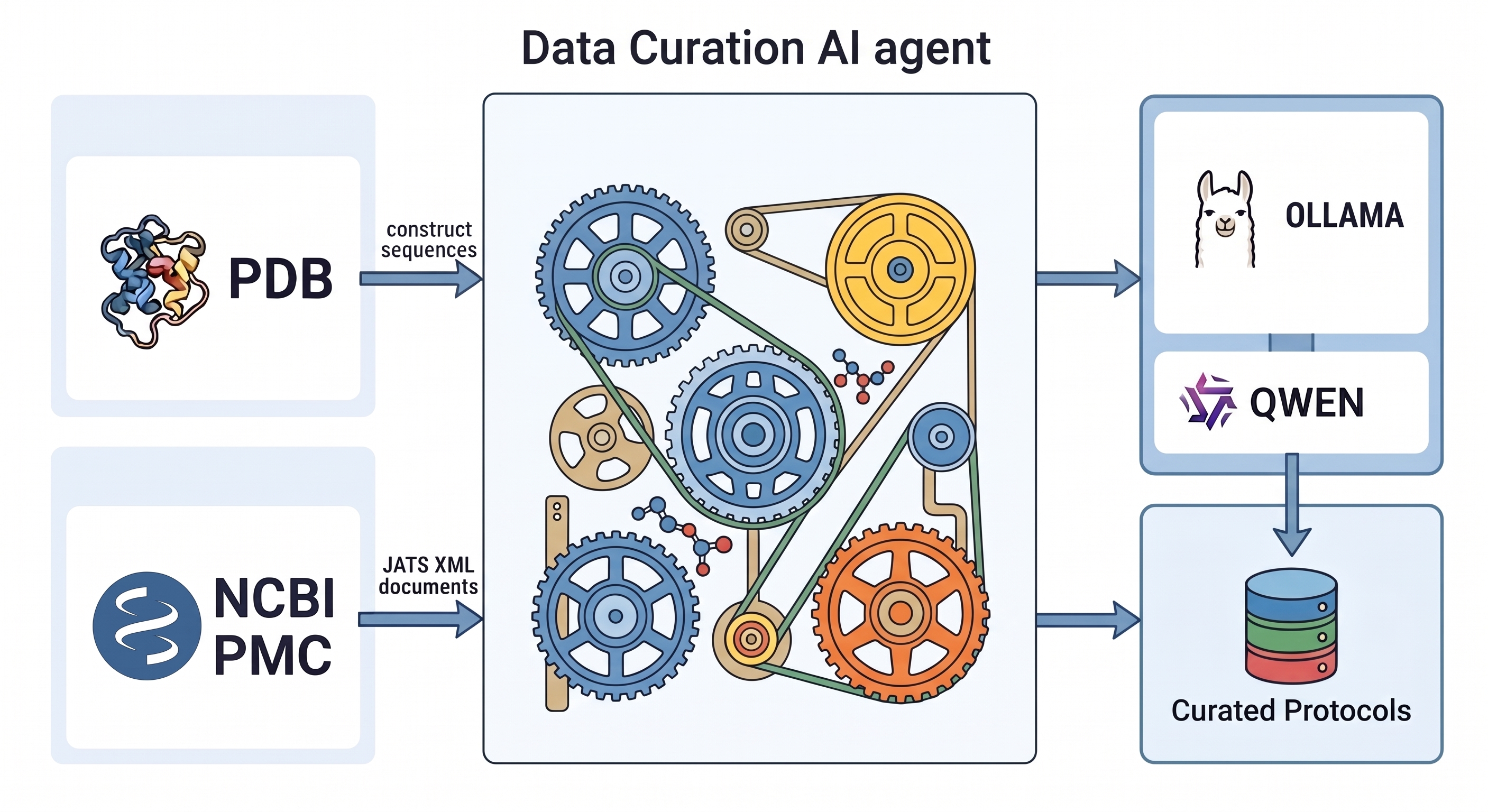 Fig. 2. The architectural diagram of the agent. Figures generated by Gemini.
The dataset
I have chosen to use the PDB as a starting point. Each PDB structure is typically accompanied by a publication, and that publication is referenced from the PDB entry. A protein must be expressed and purified before its structure can be determined, so these papers are quite likely to contain protein production protocols, either in the main text of the publication, or in the supplements, or among the cited literature. In general only the result of successful experiments get published, so the resulting dataset will contain mostly (or exclusively) positive outcomes, where the POI has in fact been produced. The PDB entry itself contains a lot of relevant information, like the protein sequence and information about the protein complex.
The PDB provides a flat file that maps each PDB id to a PubMed id of an academic paper. NCBI PubMed ID, or PMID, points to what is essentially a library card for the publication. It provides information like the title, journal, date, authors, sometimes the abstract, but not the full text. The majority of publications on life sciences have PubMed entries.
Publications are also often deposited to PubMed Central Repository (PMC). This repository does provide the publication text, along with the supplements. The publications within it are referenced by PMCID. Being deposited to PMC does not automatically imply that anyone can do with the publication whatever they want (e.g. extract information from it). Some of the publications in PMC come under restrictive licenses. Those that are covered by permissive open source licenses are flagged as open pmc. Recently, the PMC has migrated to Amazon Web Services (AWS) S3 storage. The openly accessible S3 “bucket” is called pmc-oa-opendata. The full list of papers in PMC, along with their PMIDs, can be downloaded here.
As of September 2026 there were more than 50,000 publications linked from PDB in PMC. A conservative estimate is that half of them contain a protein production protocol. Note that there is lots of overlap in PDB, so these protocols are not guaranteed to be unique. More protein production protocols could be extracted from the publications that are not referenced from the PDB, but 25,000 is a good start.
Each publication (version) corresponds to a folder with files in S3 PMC. Typically there would be the main text, plus some supplements. The main text is typically formatted as a PDF, according to the style of the journal where the paper was published. Supplements come in a variety of formats: there could be a zip archive with all the supplements, MS Word files, PDFs, MS Excel tables, images, movies, etc. Most importantly, though, almost always there is a JATS XML file with the main publication text. The text is marked up to show the structure (sections, paragraphs, …), the typographics (subscripts, superscripts, equations, …), citations, front and back matter (list of authors and affiliations, references, …) and other important information. Since JATS XML is almost always available for the publication, and for some other reasons described below, I decided to use these files as inputs to the LLMs.
The implementation
Expert proposes Excel spreadsheets for data exchange. This dataset might be re-formatted as Excel, but modern LLMs are usually better trained to deal in open formats, like JSON or XML. The first step of the project was therefore to convert Expert templates into an annotated JSON schema.
Prompt and context
The LLM prompt contains the JSON schema, the publication text in JATS format, the information from the PDB about the protein sequences and complexes, and some instructions on how to put this all together. The full prompt can be downloaded from here. With all placeholders filled in (especially the paper), it becomes quite a long document, potentially hundreds of thousands of tokens. This can become a problem, because LLMs are configured during training with a maximum amount of tokens that they can reason over - the context window. Ollama 3.8 27b has a huge context window of 256K tokens. There are guides online that recommend limiting the context window quite aggressively to speed up performance. In this project care must be taken to leave enough context to accommodate the long publication, the schema, the PDB information about the sequences and the LLM chain of thought.
To avoid wasting the LLM compute on unnecessary text, the front and back matter of the paper (i.e. the list of authors with affiliations and the list of references) are removed before including the text in the prompt. The drawback of this approach is that if the protocol is not available in the publication but is referred to via one of the cited papers, the agent has no way of retrieving it. In the future, I might experiment with including the references and adding more tools for fetching the cited papers text, or create a separate pipeline for papers with protocols in references.
Another possible approach improving performance with long documents is splitting the pipeline into two stages: extract the short paragraphs relating to protein production first, and then use a separate prompt to extract Expert data from those short paragraphs. The drawback of this approach is that the errors from the two steps can accumulate. If the first step misses some important part of the paper, the second step has no way to recover it. I decided to perform the entire data extraction with a single prompt.
Tips and tricks
Ollama (and other agentic AI frameworks) allows tweaking lots of parameters when interacting with the LLM. After trying multiple combinations, I ended up with one rule of thumb: make your configuration look as similar to how a general purpose AI agent like Codex or Claude would work as possible. Modern LLMs are heavily fine-tuned to support this mode of operation, and departing from it makes the extracted data less accurate. In practice, this means:
- Leave streaming on
- Leave thinking on
- Leave the context window large enough to accommodate the publication, rest of the prompt, the thought chain and the result. The full 256K is probably an overkill, 100K should be good enough.
- Increase
num_batchas high as your GPU can handle. This speeds up prompt-processing (prefilling) of large publications. - Do not specify
format=json. Either use the “system prompt” that instructs the LLM to spew json in the result, or use special tools to report the final result (see below).
Other tips and tricks, that are more to do with good engineering practice than specific for building AI agents:
- Capture the Ollama performance statistics: prompt and eval duration and counts.
- Always wrap handling of each paper with a try/catch block. LLMs produce non-deterministic results, and no system prompt will ever guarantee that a valid schema-compliant JSON will be returned 100% of the time.
Tool calling
Modern LLMs support “tool calling” - usage of auxiliary software systems as intermediate steps to accomplish the task defined in the prompt. The list of available tools is provided to the model alongside the prompt. Tools can make the agent much more powerful compared to using just the pure LLM. They can include things like executing arbitrary Python code, or querying bioinformatics databases, retrieving references, parsing supplementary information presented in various formats (PDF, Excel, …), performing Internet search, etc.
There are certain hidden pitfalls with tool calls that should be avoided:
- The agent issues prompts to the LLM and appends tool results in a loop. The original prompt with available tools is sent first, then the LLM responds with what tools should be called with what arguments, then the agent executes the tools and appends the results to the prompt and sends that to the LLM, the LLM may then respond with more tool calls and so on. Care must be taken for this loop not to run infinitely. Note that the LLM does not maintain any state between the calls, so everything must be included in the prompt.
- Elaborate specifications of tool calls and results consume the context window.
- Very generally specified tools, for example an ability to execute arbitrary Python code, can pose security threats of the model “escaping the sandbox”. If such capabilities are given to the agent, it should be isolated from the rest of the world by some other means, e.g. run in a restricted Docker container that cannot access the outside volumes and can only connect to the Internet via a proxy.
- The latest editions of the LLMs that I came across (Qwen) are heavily fine-tuned towards calling tools. If a general tool is provided, the model will call it, even if strictly speaking it does not have to. For example, there could be lots of Python code snippets in the output that verify figures in the publication that should have already been verified by the authors (e.g. sequence lengths). The LLM is not doing anything while the agent is calling tools, so the GPUs are not efficiently utilised. One workaround for this is using more sophisticated orchestration tools instead of Ollama, like vLLM or LangChain. Another options is being much more prescriptive and restrictive in the prompt about what tools can be executed.
- Multiple tool calls typically do not depend on one another and can be executed in parallel. Python
asyncprogramming can help. - Tools do not mix well with structured result, like JSON. Online guides recommend adding a special tool for receiving structured output, if required.
- There are lots of ready made tools out there, for example for calling bioinformatics databases, often packaged as “MCP Servers”. Unless maintained by the owners of the resource, these “unofficial MCP servers” are often out of date and don’t work. Modern AI coding assistants, like Claude or Codex, allow building your own simple tools in a fraction of the time it would take to get the third party tools to work.
- Tool calling increases the time it takes to process one paper. In my trials, it took about 1.5 minutes to process the paper without the tools, and up to 5 minutes with the tools.
Discussion
Assuming the pipeline described above takes about 5 minutes to process one paper, it would take about 6 machine-months to process the entire dataset. A staged approach would therefore make sense, with a subset of papers used for curating the prompt and the set of tools and evaluating the accuracy of output. The 6 months estimate looks scary, but this is clearly quicker than a human could curate this data. During this pilot project the LLMs have demonstrated an advanced level of understanding of complex biochemical publications. For example, the papers that contained similar constructs that were purified for crystallisation and were used for cell-based assays were annotated correctly.
This brings us to the question on how the dataset produced by this method could be verified. It is well known that LLMs make mistakes, and it is dangerous to use their output as is, without cross-checking it first. AI advocates would argue that humans also make mistakes. One could devise a different set of prompts and tools to create another AI agent for cross checking this data, possibly running it with a different LLM. Another option is engaging with the authors of the publications, where possible, and asking them to cross check the data. Any resource built on top of this data would have to clearly delineate between the AI curated data, and manually cross-checked data.
The combination of the PDB with academic publications provides a wealth of information about protein production, however, even from my limited trials in the scope of this project, it is clear that some fields that are marked as “critical” in Expert are systematically left out from the papers, for example, the codon-optimised genetic sequence of the transcript (C3) or the vector (C5/C6). This project alone cannot extract all the necessary information about protein production. This is a complimentary effort that provides maximum value along with Expert/Biobank style datasets and manual curation.
Glossary of agentic AI terms
| Term | Meaning |
|---|---|
| LLM | Large Language Model, a software system that predicts the next token based on the context: the input tokens plus the previously generated tokens. |
| Token | A word or a part of a word. Units of information that LLMs deal with. |
| AI Agent | An application that allows users to interact with LLMs and allows LLMs to use tools. |
| Prompt | The user instruction to an AI Agent or an LLM. |
| Context window | The number of tokens that the LLM can reason over. The maximum is hard-coded in the LLM at training time. It can be configured to a lower value, but this should leave enough space for the prompt, the chain of though and for the tooling. |
| System prompt | Part of the prompt that contains foundational instructions to the LLM that defines its role and the output format. |
| Thinking / Reasoning / Chain of thought | Part of the LLM output where it “explains to itself” what it is about to do before generating the final response. The chain of thought it typically discarded when processing the LLM result. |
| Tools | Auxiliary software systems used by AI agents to accomplish the task, steered by LLM output. |